Blog
Adjusting time delay on heat strips for Mitsu ASHP – GreenBuildingAdvisor


We have just about reached occupancy in our new build, next week. We have a Mitsu City Multi ASHP (PUMY-P42NKMU2 with 2x PVFY series AHUs). Cold climate, I think we’re CZ6. We have heat strips on both air handlers. I’m trying to learn how to adjust the settings a tiny bit… We have PAR-40MAAU controllers.
Our HVAC installer explained that we should not change the temp in the house because it’s most efficient to just leave it at one temp day/night. That seems a bit unreasonable. We want to sleep with a cooler temp and have it much warmer during the day, the guy suggested *opening a window* in the bedroom to cool it down instead of setting the thermostat lower overnight. He said the auxiliary heat will be trigged after 15 mins if it cannot reach the set temp, so if we are swinging the temp by having it say 67º for sleeping but want it to come up to like 74º in the morning, it will trigger the heat strips and waste energy. But we really don’t want heat blowing into all the bedrooms overnight. It is not something we are used to, having this super slow temp control in a big-ish house compared to our small condo where we can swing the temp 5ºF in no time.
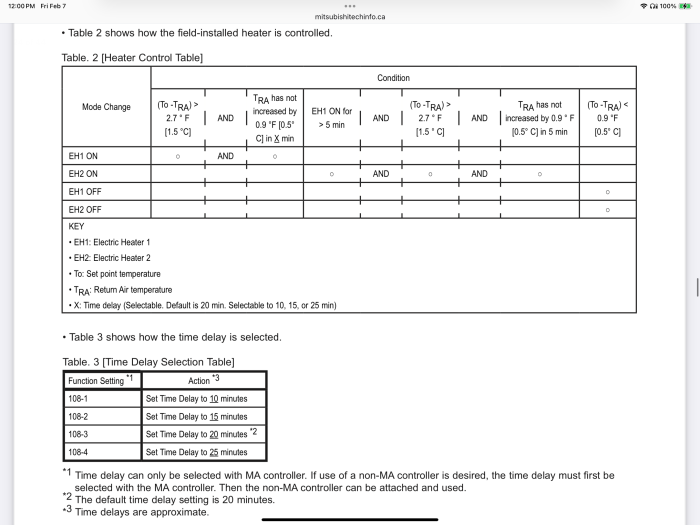
Anyway in 2025 I don’t think we need to use windows as our primary method of temperature control in a seemingly high tech house. Engineer said what I want is totally possible. He sent the heat kit info (too big to attach on GBA) which basically shows it can be set to either comfort mode or energy save mode and that looks like it just changes the allowable temp differential for the strips to be triggered (1ºF vs 2.7ºF).
Our idea is to do the following:
1. Set Mitsu timer/schedule to our overnight temp like 67º or 68º in winter and then incrementally ramp up to desired temp in the morning maybe over a couple hrs (i.e. 73ºF) by setting time slots going up a couple degrees at a time.
2. Set the heat kit time delay (X) to more than 15 mins so it is less sensitive… function 108-4 according to the table below for ~ 25 mins delay.
3. Switch heat kit to energy save mode in AHU control board SW3-4 ON instead of comfort mode (3-4 OFF) so strips will only come on if the return air temp is > 2.7ºF below set temp after X time.
As far as #2… maybe a stupid question but … how do I actually set the function for the time delay? I know that it is setting 108-4 to adjust time delay… but I don’t see how I can learn how to actually set that on the controller. I only know as far as entering the admin password (probably 0000 or 9999). The controller itself is archaic to me and not intuitive at all. It would be much easier to have an app and just click heat kit > time delay > XX mins…
And then for #3, I understand I want to do that but I’ve never looked at the control board. I think I just open the little panel on the top/front of the air handlers. I will not be touching *anything* aside from the one switch the engineer said to change. I’m wondering if it is simply a physical switch and all I need to do is flip the one labelled SW3-4 from OFF to ON. We definitely don’t want comfort mode because the heat strips will be coming on all the time in this cold weather. The house is a decent size so it is slow to heat with this system but it is very well insulated so seems to hold a temp really well.
… also, is there any way to tell whether the heat strip is running or not? Not sure if it shows up on the controller or something.
Thanks in advance! I thought this would be way too complicated but as soon as the engineer sent over the heat kit manual and I read some of that along with some of the air handlers info it seems relatively straight forward, at least for this little tweak I want to make.
GBA Detail Library
A collection of one thousand construction details organized by climate and house part
Search and download construction details